banner

SLIDE BAR

Image Slider By nurmonyitworld.net.ms NUR-MONY IT WORLD ENG.KAMRUL HASAN IFAZ. ''প্রযুক্তিকে ভালবাসুন।প্রযুক্তির সাথে থাকুন সবসময়, প্রযুক্তির আলো ছড়িয়ে দিন বিশ্বময়”

হেডলাইন

WELCOME TO OUR BLOG SITE.IF U LIKE OUR BLOG PLEASE SHEAR UR FRIENDS.Email us to inform about our wrong information. to inform about product price and specification, to inform about new product in the market, to inform that what you want to know?THANKS VISIT OUR BLOGSITE
HACKING TIPS লেবেলটি সহ পোস্টগুলি দেখানো হচ্ছে৷ সকল পোস্ট দেখান

২৩ মার্চ, ২০১৩

How to Change the Size of Virtual Memory/ Paging File

             **********বিসমিল্লাহির রাহমানির রাহীম**********
          ((((((((((লা ইলাহা ইল্লাল্লাহু মুহাম্মাদুর রাসূলুল্লাহ))))))))))
             শুরু করছি আল্লাহর নামে যিনি পরম করুণাময়, অতি দয়ালু

 pσst вч єng.kαmrul hαsαn ífαz


PNG Image of RAM, Virtual Memory, Main Memory


In my previous post I talked about virtual memory. Today I'm gonna discuss about how to change the size of virtual memory. Before starting the main discussion I would like to say something about virtual memory again. But I recommend you to read my previous post about virtual memory. 

A part of your hard disk space is used to support or accelerate the operations of your PC. This part is know as Paging File or Virtual Memory. When the amount RAM is low, it is virtual memory that supports RAM to carry out its activities. The term Virtual Memory and Paging File are used interchangeably. 


By default Windows sets a virtual memory on your PC. Sometimes it may not be accurate. Or it may not be in the way that you would like to set. In that case you can change the size of virtual memory. 

For example: 
  • You may need to increase or decrease the size or virtual memory
  • You may like to change the drive for virtual memory etc

২১ মার্চ, ২০১৩

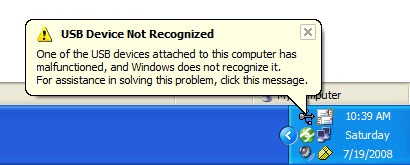
Fixing windows error: USB not recognized

                           **********বিসমিল্লাহির রাহমানির রাহীম**********
                             ((((((((((লা ইলাহা ইল্লাল্লাহু মুহাম্মাদুর রাসূলুল্লাহ))))))))))
                           শুরু করছি আল্লাহর নামে যিনি পরম করুণাময়, অতি দয়ালু


pσst вч єng.kαmrul hαsαn ífαz


It can be a common problem friends that all a sudden all your USB ports will stop working , or your windows will irritatingly starts prompting  “USB not recognized” but for the error there is nothing to be worried , use the following steps and get a rid from this:


Go to device manager.
click on USB controllers , you will see a list of USb hub ports, click on each of them and unistall them one by one .
When you are finished uninstalling all your Usb ports just power off your pc and restart it after a period of 20 minutes.

What is IP (Internet Protocol)?

                                 **********বিসমিল্লাহির রাহমানির রাহীম**********
                                ((((((((((লা ইলাহা ইল্লাল্লাহু মুহাম্মাদুর রাসূলুল্লাহ))))))))))
                              শুরু করছি আল্লাহর নামে যিনি পরম করুণাময়, অতি দয়ালু


post by :Eng,kamrul hasan ifaz


1. Short for Internet Protocol, IP is an address of a computer or other network device on a network using IP or TCP/IP. For example, the number “166.70.10.23″ is an example of such an address. These addresses are similar to an addresses used on a house and is what allows data to reach the appropriate destination on a network and the Internet.
There are five classes of available IP ranges: Class A, Class B, Class C, Class D and Class E, while only A, B, and C are commonly used. Each class allows for a range of valid IP addresses. Below is a listing of these addresses.
Class Address Range Supports
Class A 1.0.0.1 to 126.255.255.254 Supports 16 million hosts on each of 127 networks.
Class B 128.1.0.1 to 191.255.255.254 Supports 65,000 hosts on each of 16,000 networks.
Class C 192.0.1.1 to 223.255.254.254 Supports 254 hosts on each of 2 million networks.
Class D 224.0.0.0 to 239.255.255.255 Reserved for multicast groups.
Class E 240.0.0.0 to 254.255.255.254 Reserved for future use, or Research and Development Purposes

১২ মার্চ, ২০১৩

হ্যাকিং পর্ব (কম্পিউটার)

                                       **********বিসমিল্লাহির রাহমানির রাহীম**********
                                         ((((((((((লা ইলাহা ইল্লাল্লাহু মুহাম্মাদুর রাসূলুল্লাহ))))))))))
                                      শুরু করছি আল্লাহর নামে যিনি পরম করুণাময়, অতি দয়ালু


 পাসওয়ার্ড না জেনেই
কম্পিউটারে প্রবেশ
করুন সহজে |
আপনার কম্পিউটারে নতুন অ্যাকাউন্ট খোলার পর
Administrator অ্যাকাউন্টটি আর
দেখা যাবেনা । এরপর
আপনার নতুন
অ্যাকাউন্টটিতে পাসওয়ার্ড
সংযুক্ত করলেন । এমতাবস্থায় পাসওয়ার্ড ভুলে গেলে কি করবেন ?
যদি Administrator
অ্যাকাউন্টটিতে পাসওয়ার্ড
না দেওয়া থাকে , তাহলে এর
সমাধান আছে।

join fb

Join Me On Facebook
^ Back to Top